Playground Test Data and Flow
This page contains various test data and everything you need to know to test your integration with Beam. Note that this data is for testing purposes with Beam Playground only and cannot be used in our production environment.
To fully understand the testing process, we highly recommend reading our other API guides such as Charges, Payment Links first before proceeding with the testing.
Testing Credit Card Payment
You can use the following test card numbers to simulate various payment scenarios in the Beam Playground. These cards are designed to cover different brand and outcomes, including successful payments, failed payments, and refunds.
For all cards, the expiry date must not be later than the day you call the API. (ex. On September 9th 2024, a card with expiry date of 09/24 will still work, but a card with 08/24,09/23 will not.)
Card (CARD)
| Scenario | Card Number | CVV | Card Brand | Result | Failure reason | Note |
|---|---|---|---|---|---|---|
| Credit Card Success: Mastercard Card | 5372074248113841 | 123 | Mastercard | SUCCEEDED | - | - |
| Credit Card Success: Visa Card | 4111111111111111 | 123 | VISA | SUCCEEDED | - | - |
| Credit Card Success: Amex Card | 378282246310005 | 1234 | AMEX | SUCCEEDED | - | - |
| Credit Card Pending: Force Charge Page | 4389783280144506 | 123 | - | PENDING | - | Redirect payer to Force Charge page |
| Credit Card Pending: OTP Page | 4953261730509988 | 123 | - | PENDING | - | Redirect payer to OTP page |
| Credit Card Failure: Insufficient Funds | 4943129900084541 | 123 | VISA | FAILED | INSUFFICIENT_FUNDS | - |
| Credit Card Refund Failure: Refund Not Allowed | 4000007640000003 | 123 | VISA | SUCCEEDED | - | Refund is not allowed |
| Credit Card Refund Failure: Refund Failed | 4000000000005126 | 123 | VISA | SUCCEEDED | - | Refund will fail |
| Credit Card Failure: Payment Rejected | others | 123 | - | FAILED | REJECTED | - |
Card Installments (CARD_INSTALLMENTS)
| Scenario | Card Number | CVV | Card Brand | Result | Failure reason | Note |
|---|---|---|---|---|---|---|
| Credit Card Installments Success: KBANK Card | 4417704002802961 | 123 | - | SUCCEEDED | - | - |
| Credit Card Installments Success: KTC Card | 4391370000000006 | 123 | - | PENDING | - | - |
Card Network Token (CARD_NETWORK_TOKEN)
Currently, any number can be used to simulate a successful payment with network tokenization.
Other payment methods
Creating charge with other payment methods would result in a charge whose actionRequired is ENCODED_IMAGE that
redirects payer to force charge page.
Here are other payment methods:
QR_PROMPT_PAYALIPAYLINE_PAYSHOPEE_PAYTRUE_MONEYWECHAT_PAYSCB_EASYKRUNGSRI_APPBANGKOK_BANK_APPKPLUSMAKE
Force Charge Page
The Force Charge page is a simulated page that allows you to act as a gateway to mark payment as succeeded whenever you want. This page is used to mimic real-world scenarios where payment is not instant.
Initial state of the Force Charge page with Mark as Succeeded button:

After pressing the Mark as Succeeded button, the page will show that the payment is completed
with the Return to merchant button.:

Upon pressing the Return to merchant button, you will be redirected back to the returnUrl you specified in the
charge creation request.
OTP Page
The OTP page is a simulated page that allows you to act as your payer to enter a one-time password (OTP) to complete the payment. This page is used to mimic real-world scenarios where OTP is required for authentication.
Initial state of the OTP page with OTP input field and Submit button:
- Enter
123456forSUCCEEDEDcase - Enter anything else for
FAILEDcase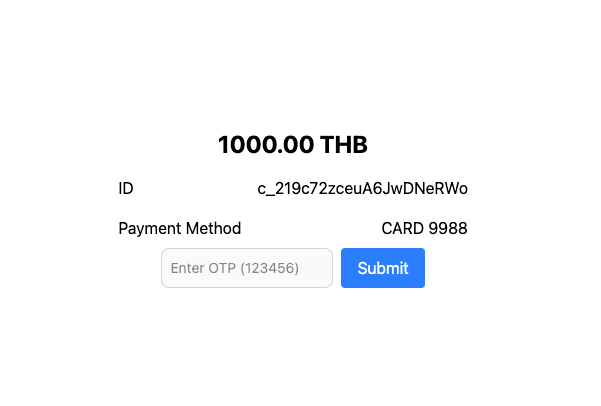
After entering the OTP and pressing the
Submit
button, the page will show that
the payment
is completed with the Return to merchant button.:
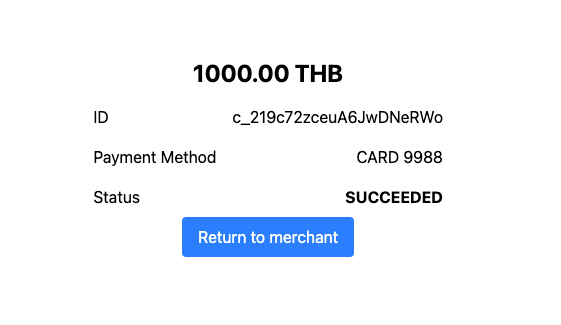
Upon pressing the Return to merchant button, you will be redirected back to the returnUrl you specified in the
charge creation request.