Bolt Intent
Bolt Intent is an intent to receive payment from customer handled by a Beam Bolt device.
It specifies how you want your customer to pay, including the amount, payment method (e.g. Card, Card Installments, QR Prompt Pay), and specific details of that payment method if any (e.g. installment period).
For Paired Mode, you create a Bolt Intent to send payment request to the connected Beam Bolt device.
For Deep Link Mode, you create a Bolt Intent to generate a deep link URL to redirect your application to Beam Bolt app for payment processing.
You can set Bolt Intent’s expiry on its creation, or cancel it.
Once a Bolt Intent is created and handed off to Beam Bolt device or Beam Bolt app, the device/app will prompt the customer to make payment according to the Bolt Intent details.
Upon attempting payment, a Charge will be created with sourceId equals to the Bolt Intent’s id.
Charges created from Bolt will be shown in the Bolt Charges page in Lighthouse.
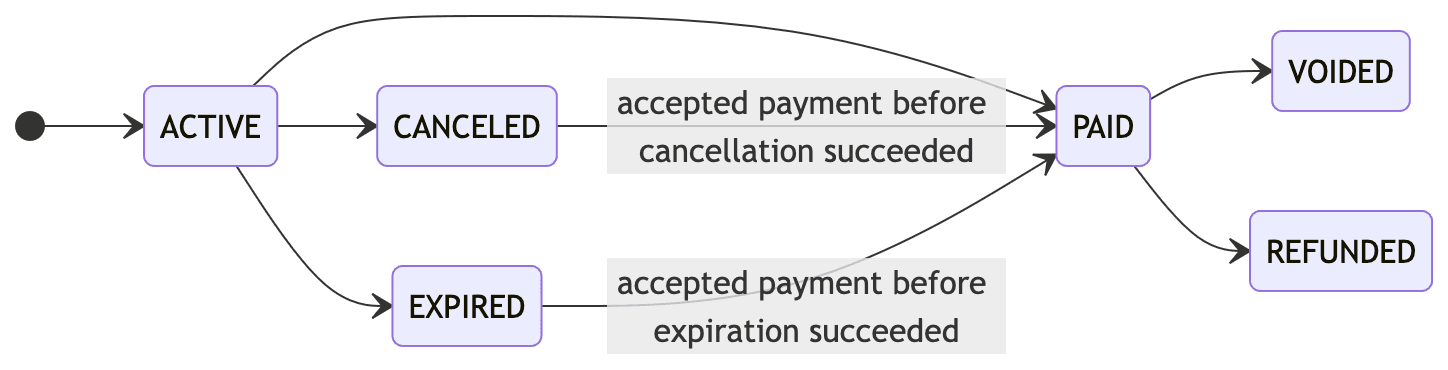
Bolt Intent Lifecycle
ACTIVE- The Bolt Intent is active and ready to accept payments.PAID- The Bolt Intent has accepted a successful payment and can no longer accept payments.CANCELED- The Bolt Intent is canceled and can no longer accept payments.EXPIRED- The Bolt Intent has expired and can no longer accept payments.VOIDED- The charge associated with the Bolt Intent has been voided, thus the Bolt Intent can no longer accept payments.REFUNDED- The charge associated with the Bolt Intent has been refunded, thus the Bolt Intent can no longer accept payments.
A canceled/expired Bolt Intent does not receive further payment attempt, i.e. a new Charge cannot be created from this Bolt Intent, but Charges created before the expiry could succeed or fail after the expiry.
Here is a state diagram of Bolt Intent’s status: